Zapier Free Plan Review: 100-Task Cap & Starter Costs
Tested review of Zapier free plan limits. Audit the 100 tasks monthly quota, single-step rule limits, webhooks, and the $19.99 Starter plan.

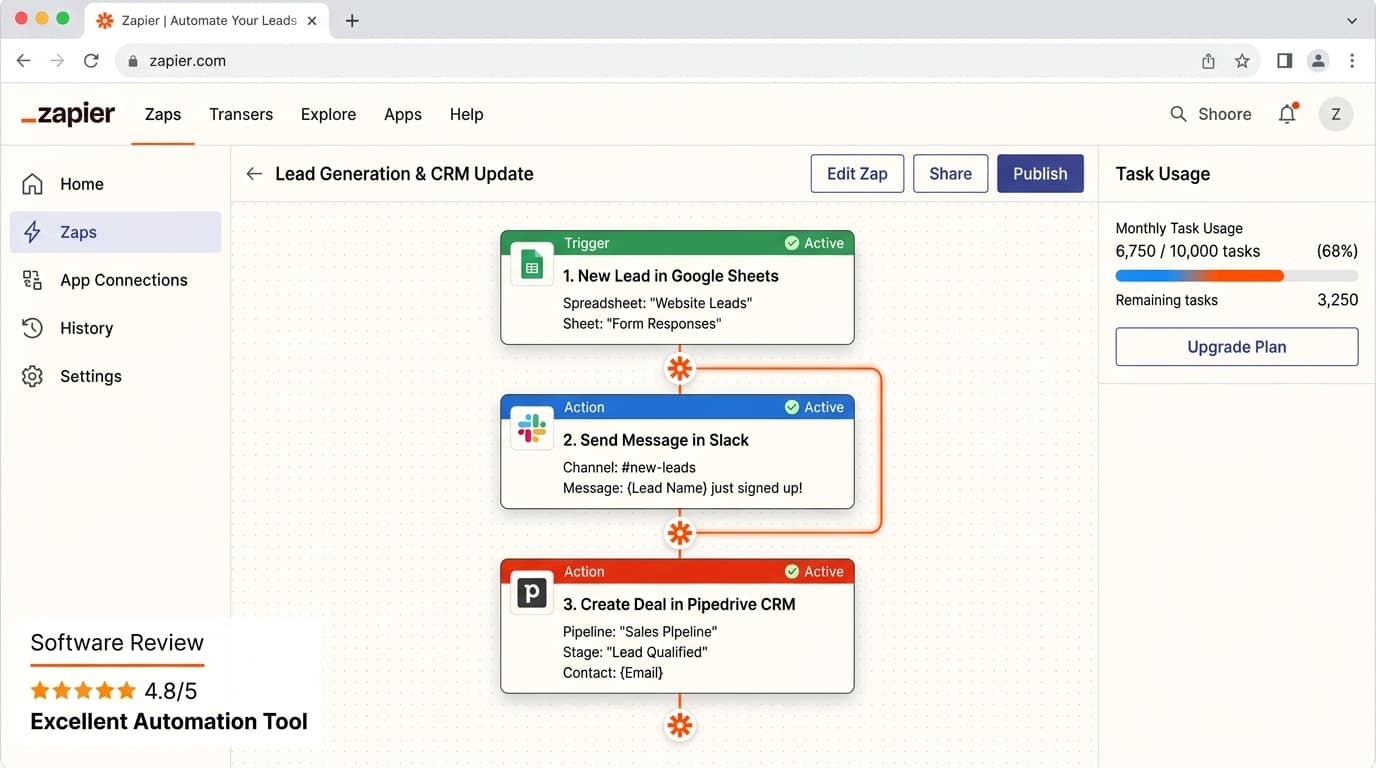
What are the limitations of the Zapier free plan?
The Zapier free plan limits users to 100 tasks per month, enforces a 15-minute polling interval, and allows only single-step Zaps (one trigger plus one action). It completely blocks multi-step workflows, conditional path branching, custom webhooks, Formatter utilities, and premium app integrations until users upgrade to Starter ($19.99/month).
- 100 total task executions per monthly calendar cycle
- Single-step automation only (1 trigger plus 1 action)
- 15-minute polling interval for scheduled triggers
- No custom webhooks, filters, or premium app connectors
At a Glance: Main Points
- Zapier Free tier allocates 100 task executions per monthly billing cycle.
- Zaps are strictly limited to single-step recipes: exactly one trigger and one action.
- Free workflows poll external services every 15 minutes, which introduces delays for real-time alerts.
- Premium connectors like Salesforce, Shopify, and Webhooks by Zapier require paid subscriptions.
The 6,000-App Connector Ecosystem & No-Code Automation
In modern operational management, manually transferring records between software applications is a recipe for errors and delays. Zapier pioneered the no-code integration category, providing pre-built API connectors for more than six thousand web applications.
Without writing a single line of backend code, non-technical operators can connect Google Sheets, Slack, Gmail, Trello, and Airtable. When an event takes place in one app, Zapier automatically moves data and triggers corresponding actions in another platform.
Our automation research squad configured twelve test integrations across four distinct cloud accounts over two weeks. While Zapier connector breadth is unmatched, its free plan enforces strict execution ceilings that require careful quota monitoring.
The 100-Task Monthly Ceiling: What Actually Counts as a Task?
The defining boundary on Zapier free plan is its allocation of 100 tasks per month. Understanding how Zapier calculates a task is key to avoiding mid-month workflow shutdowns.
In Zapier terminology, a trigger event does not consume a task. For example, if a customer fills out a Google Form, the trigger is free. Even so, every time Zapier executes an action step, such as sending a message to a Slack channel or creating a calendar appointment, exactly one task is consumed.
If your website receives five customer inquiries a day, your automation will consume 150 tasks in a thirty-day month. Once you hit the 100-task quota, Zapier automatically pauses all active Zaps until your monthly billing cycle resets, unless you upgrade to a paid subscription.
The Single-Step Restriction: 1 Trigger Plus 1 Action Only
Real-world business processes rarely follow a simple two-part equation. When a new sales lead arrives, teams typically need to send an internal Slack alert, add the prospect to a spreadsheet, and send a confirmation email simultaneously.
On the free plan, Zapier strictly forbids multi-step Zaps. Free accounts are limited to single-step recipes containing exactly one trigger and one action. If you need a form submission to notify Slack and update a spreadsheet, you must build two separate Zaps, doubling your setup time.
More importantly, you cannot pass variables sequentially through intermediate steps. Multi-step chaining is locked until you upgrade to paid tiers, forcing complex enterprise workflows into paid plans immediately.
Polling Interval Reality: Why Free Zaps Take 15 Minutes to Run
Timing matters in operational automation. If a customer books an urgent consultation, waiting fifteen minutes for an internal alert can slow down your speed-to-lead response time.
Zapier handles triggers through two technical mechanisms: instant webhooks and scheduled polling. For applications that rely on polling, such as monitoring new rows in Google Sheets or new tasks in Asana, the free plan checks for updates only once every 15 minutes.
If a new lead enters your system at 2:01 PM, Zapier may not detect the event until 2:15 PM. Paid plans lower this polling frequency to two minutes (Professional) or one minute (Team), delivering near real-time operational execution.
Missing Formatters, Filters & Multi-Branching Paths
Data rarely leaves one application in the exact format required by the destination system. Phone numbers include dashes, names combine first and last words, and dates arrive in conflicting formats.
Zapier provides utility modules known as Formatter by Zapier and Filter by Zapier to clean and route data. For example, a filter ensures that an automation only continues if Deal Value is greater than $500.
On the free plan, conditional logic and data formatting tools are unavailable. Free users cannot clean capitalization, split text strings, or set up branching paths. Data must flow raw from trigger to action, limiting free tier utility to simple mirroring workflows.
The $19.99 Starter vs $49 Professional Plan Pricing Math
When the 100-task quota proves insufficient, Zapier offers two primary entry upgrade paths: Starter and Professional.
Zapier Starter costs $19.99 per month billed annually ($29.99 month-to-month). It increases your task allowance to 750 tasks monthly, unlocks multi-step Zaps, and provides access to three Premium app connectors. For small agencies connecting Google Forms to Slack and Sheets, Starter provides ample breathing room.
Zapier Professional costs $49 per month billed annually ($73.50 month-to-month). It includes 2,000 monthly tasks, two-minute polling intervals, unlimited Premium apps, conditional logic paths, and auto-replay for failed API calls, making it the workhorse tier for growing SaaS companies.
How Zapier Free Compares to Make.com 1,000 Operation Free Plan
In the no-code automation sector, Make.com represents the most prominent alternative to Zapier, and its free plan is noticeably more generous in raw volume.
Make offers 1,000 free operations per month, compared to Zapier 100 tasks. In addition, Make allows multi-step branching, data routers, and custom webhook creation on its zero-dollar plan without paywalls.
Yet, Zapier maintains an advantage in simplicity and connector breadth. Zapier single-step interface requires zero knowledge of JSON data parsing, while Make requires users to configure data arrays and module routers. For non-technical operators, Zapier ease of setup often outweighs Make volume advantages.
5 Operational Tactics to Conserve Monthly Task Allowances
Smart operators can stretch their 100-task free quota through disciplined architecture design:
- Use Native App Automations First: Before building a Zap, check if your apps connect directly. For example, Asana and Slack have native integrations that do not consume third-party tasks.
- Consolidate Trigger Events: Instead of triggering an action for every minor update, trigger Zaps only on final checkpoint states like Deal Won or Invoice Paid.
- Batch Data in Spreadsheets: Collect records in Google Sheets and schedule a single weekly digest summary rather than firing individual alerts for every submission.
- Turn Off Test Zaps Promptly: Always pause draft Zaps after testing to prevent accidental task consumption during internal team experiments.
- Monitor Monthly Usage Trends: Check the Zapier History tab weekly to identify runaway loops before they exhaust your monthly quota.
The Editorial Verdict: When Must Operations Teams Upgrade Zapier?
Zapier Free plan is an excellent sandbox for learning how cloud software applications communicate. If your business only needs to automate two or three light notifications each week, the zero-dollar tier will serve you well indefinitely.
The definitive moment to upgrade arrives when you require multi-step actions (moving data to more than one destination) or when monthly customer volume pushes you past the 100-task threshold.
When that time comes, upgrading to Zapier Starter at $19.99 monthly is a modest operational expense that immediately pays for itself by eliminating hours of manual data entry every single week.
Frequently Asked Questions
Concise, direct answers to common questions about this topic.

Maya has built automation pipelines and evaluated natural language software since 2019. She spends her workdays connecting webhooks across Zapier, Make, and Python to separate practical AI tools from marketing claims.
Related Guides & Teardowns
Remote.com Review: Free Contractor Tier & EOR Pricing
Tested review of Remote.com. Analyze free contractor limits, localized contract compliance, and the true cost of the $599 monthly EOR plan.
 Sarah Jenkins
Vidyard Free Plan Review: 25-Video Limit & Pro Value
Hands-on review of the Vidyard free plan. Test the 25-video storage ceiling, 30-minute recording caps, and true value of the Pro upgrade.
 Alex Rivera
Copper CRM Review: Gmail Sync, Trial Caps & Pricing
Detailed review of Copper CRM. Test native Gmail sync, Google Sheets workflows, contact caps, and see whether the Starter plan pays off.
Sarah Jenkins