Asana Free Plan Review: 10-User Cap & Timeline Limits
Tested review of Asana Personal. Check the 10-seat user cap, missing Timeline Gantt charts, lack of custom fields, and Starter upgrade math.

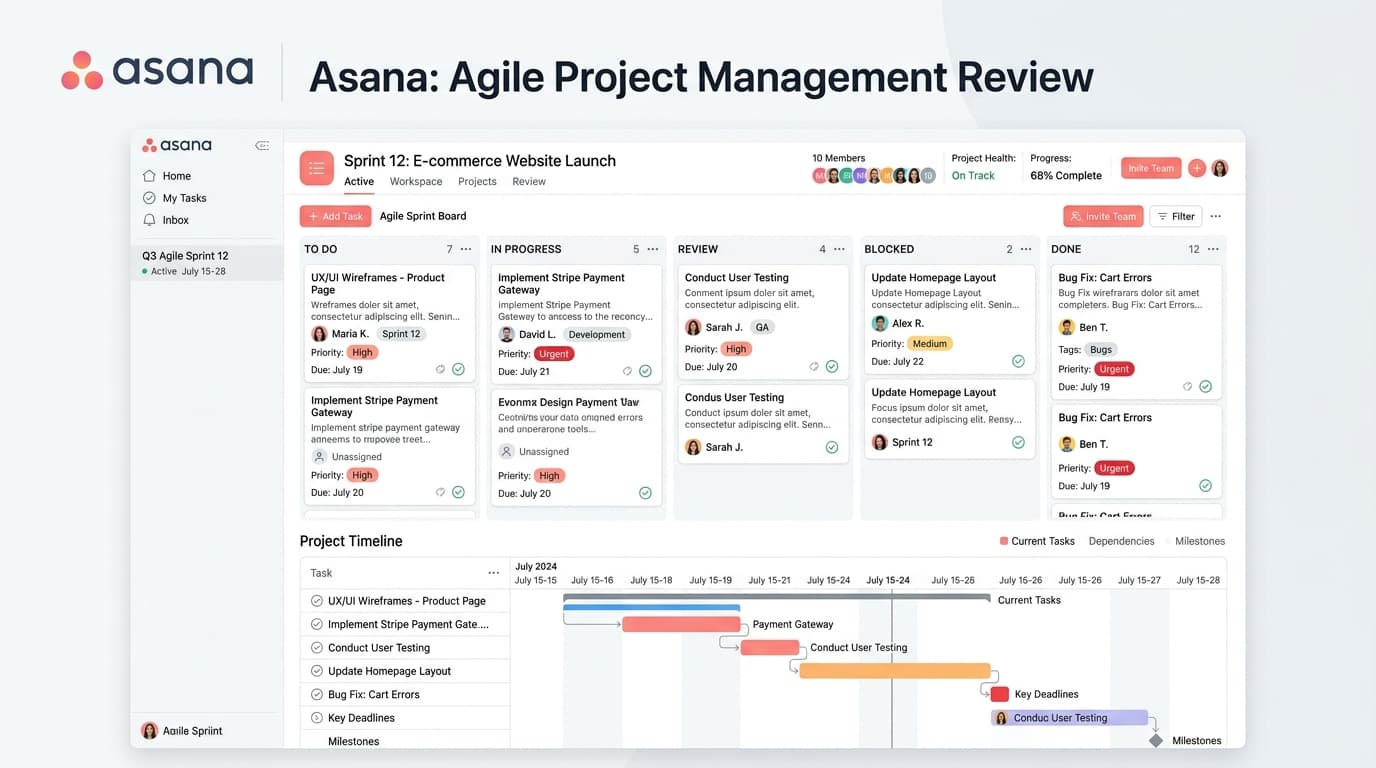
What are the limitations of Asana free plan?
Asana Personal free plan restricts workspaces to 10 total users and enforces a 100MB file attachment cap. It excludes Timeline (Gantt chart) views, custom fields, forms, automated workflow rules, and project milestones, all of which require upgrading to the Starter tier at $10.99 per user monthly.
- Maximum of 10 active team collaborators per workspace
- Unlimited tasks, projects, messages, and activity audit history
- No Gantt timeline views, task dependencies, or custom field formulas
- Starter plan upgrade priced at $10.99 monthly per seat billed annually
At a Glance: Main Points
- Asana Personal free plan strictly caps organization size at 10 active team members.
- Users receive unlimited projects, tasks, comments, and activity logs at zero cost.
- Gantt timeline charts, dependency mapping, and custom fields are withheld until the Starter tier.
- Upgrading to Starter costs $10.99 monthly per user on annual contracts, requiring payment for all seats.
Asana
Evaluation Breakdown
Pricing & Availability
✓Pros & Advantages
- Free tier supports up to 10 teammates with unlimited projects and tasks
- Fast, responsive keyboard shortcuts and delightful task-completion animations
- Multiple project views: list, board, calendar, and activity feeds
- Reliable mobile apps for iOS and Android with offline caching
✕Cons & Limitations
- Gantt timeline view locked behind paid Starter tier ($10.99/user/mo)
- Custom fields and automated workflow rules unavailable on free plan
- Single project assignee model requires workarounds for co-owned tasks
- Per-user pricing escalates quickly as headcount crosses 10 teammates
Overview: What Asana Personal Delivers for Small Workgroups
Asana has long served as a benchmark for team task tracking. For small groups and boutique agencies, Asana zero-dollar tier, officially branded as Asana Personal, provides a clean, responsive workspace that handles basic project coordination admirably.
Unlike competitors that place artificial restrictions on total task numbers or project counts, Asana Personal permits unlimited tasks, unlimited project boards, and unlimited historical activity logs. You can create detailed task descriptions, add subtasks, assign due dates, and attach files without hitting volume walls.
Our research team configured three live production workspaces in Asana Personal, managing real weekly sprint cycles over three weeks. While basic task tracking ran smoothly, we identified distinct feature gates that prompt fast-growing companies to consider paid tiers.
The 10-Seat Limit: How Asana Enforces Its User Ceiling
The most immediate constraint in Asana Personal is its 10-member seat ceiling. In past years, Asana allowed up to fifteen collaborators on its zero-dollar plan, but updated pricing policies have lowered that threshold to ten active members.
This cap applies to both full members and limited guests within your corporate domain. When you attempt to invite an eleventh collaborator, Asana displays an administrative alert requiring you to either upgrade your workspace or remove an existing teammate.
For a growing business with eight full-time staff and three external contractors, this ceiling forces an immediate purchasing decision. You cannot selectively purchase paid licenses for managers while keeping staff on free seats; Asana requires licensing every active user in your organization workspace.
Missing Gantt Timelines & Visual Dependency Mapping
While Asana Personal provides standard List, Board (Kanban), and Calendar views, it completely withholds the Timeline view. Timeline is Asana implementation of interactive Gantt charts, showing how tasks connect chronologically.
Without Timeline, project coordinators cannot visually link dependent tasks. If Task B cannot begin until Task A completes, free users must communicate that dependency manually through comment threads or task descriptions.
When schedules slip, paid users on Starter can simply drag an entire sequence forward, and all downstream dates adjust automatically. Free users must open every individual task record and manually re-enter due dates, creating unnecessary friction during complex project delivery.
Custom Fields & Status Dropdowns: Why Free Feels Generic
Custom metadata fields are the foundation of sophisticated database tracking. They allow teams to categorize tasks by priority level, client name, estimated hours, deal value, or approval state.
On Asana Personal, custom fields are unavailable. Every task card is limited to standard default fields: Task Name, Assignee, Due Date, and Description. While you can type labels as text tags, tags lack formula calculations, numerical sorting, and dropdown enforcement.
This absence makes Asana Personal feel generic when managing specialized workflows like bug tracking, client intake queues, or editorial calendars where structured status columns are mandatory.
Workflow Automation Rules: Manual Steps vs Paid Triggers
Automating repetitive administrative actions saves teams dozens of hours monthly. Asana features a powerful rule builder based on trigger-action combinations, but this capability is completely locked behind paid tiers.
On the free plan, you cannot configure rules such as: When a task moves to the Review column, automatically reassign it to the creative director and add a due date for tomorrow. Every status change, assignment update, and collaborator mention requires manual clicks.
For small squads managing twenty tasks a week, manual updates are manageable. For operational hubs processing hundreds of customer requests, the absence of automated rules leads to dropped handoffs and inconsistent project tracking.
File Storage Limits & 100MB Per Attachment Boundaries
Asana provides unlimited total file storage across all plans, including the free Personal tier. This represents a noticeable advantage over competitors that cap total workspace cloud storage at two or five gigabytes.
Even so, Asana enforces an individual file size limit of 100MB per attachment. If your creative team shares raw 4K video clips, high-resolution design archives, or extensive database backups, you cannot upload those assets directly to task records.
The standard workaround is embedding hyperlinks to cloud storage repositories such as Google Drive, Dropbox, or Box. Asana integrates seamlessly with external cloud providers, allowing teammates to preview external documents without consuming attachment limits.
Starter Tier Math: The $10.99 Per Seat Investment
When teams outgrow the 10-seat cap or require Timeline charts, the entry upgrade is Asana Starter, priced at $10.99 per user per month billed annually, or $13.49 per user on monthly billing.
Upgrading to Starter unlocks Timeline views, custom fields, forms for structured request intake, project milestones, and up to 250 automated rule actions per month. It also raises the organization user ceiling to five hundred seats.
Because Asana charges per seat across the entire workspace, an eleven-person team crossing the free threshold will pay $120.89 monthly ($1,450.68 annually). Finance directors must calculate whether Gantt charts and automated rules generate enough saved staff hours to justify this annual commitment.
How Asana Free Compares to Trello and ClickUp
Evaluating Asana Personal against competing free tiers highlights clear structural trade-offs.
Trello offers a simpler Kanban board experience with unlimited users on its free plan, but restricts workspaces to ten total boards. Asana provides unlimited boards and projects, giving it superior organizational hierarchy for multi-department operations.
ClickUp free tier includes native custom fields and sprint points at zero initial cost, but enforces strict monthly action quotas that can interrupt workflows unexpectedly. Asana free plan feels calmer and more dependable because its included features carry no hidden monthly usage meters.
5-Step Workspace Audit to Stay Under the Free Ceiling
Small teams that wish to stay on Asana Personal indefinitely can follow this five-step maintenance routine to avoid triggering upgrade modals:
- Conduct Monthly Seat Audits: Review the Members tab in your Admin Console. Deactivate past interns, contractors, and departed employees to keep your active roster strictly under ten.
- Use External Hyperlinks for Large Files: Prevent attachment errors by standardizing on Google Drive or OneDrive links for documents exceeding 50MB.
- Simulate Custom Fields with Tags: Use consistent hashtag nomenclature in task titles or text tags to categorize priorities without paid custom fields.
- Use Calendar View for Deadlines: While Timeline is locked, the built-in Calendar view shows task distributions across weeks to help balance upcoming workloads.
- Standardize Task Templates Manually: Create a project called Templates and duplicate structured task cards manually to ensure consistent team task outputs.
The Editorial Verdict: Exactly When Teams Must Upgrade
Asana Personal is one of the most polished free project management applications available today. For teams of two to nine individuals managing straightforward project goals, it delivers outstanding utility without demanding a single dollar.
The definitive moment to upgrade arrives when your headcount reaches ten, or when cross-project dependencies cause missed delivery deadlines that a visual Timeline chart would easily prevent.
If your organization reaches that inflection point, Asana Starter at $10.99 monthly delivers exceptional polish, dependable cloud infrastructure, and intuitive mobile applications that your team will adopt with zero resistance.
Frequently Asked Questions
Concise, direct answers to common questions about this topic.

Liam spent eight years setting up workspace software, documentation wikis, and task systems for software teams. He writes practical evaluations on how software handles real team communication.
Related Guides & Teardowns
Remote.com Review: Free Contractor Tier & EOR Pricing
Tested review of Remote.com. Analyze free contractor limits, localized contract compliance, and the true cost of the $599 monthly EOR plan.
 Sarah Jenkins
Vidyard Free Plan Review: 25-Video Limit & Pro Value
Hands-on review of the Vidyard free plan. Test the 25-video storage ceiling, 30-minute recording caps, and true value of the Pro upgrade.
 Alex Rivera
Copper CRM Review: Gmail Sync, Trial Caps & Pricing
Detailed review of Copper CRM. Test native Gmail sync, Google Sheets workflows, contact caps, and see whether the Starter plan pays off.
Sarah Jenkins